
Preview Upcoming Billing for a Member
1 min read
Updated
6 days ago
Changes to a member’s account, like updating their membership, adding a hold, or making billing adjustments , can affect future payments.
To see what’s coming up, you can preview their billing schedule at any time.
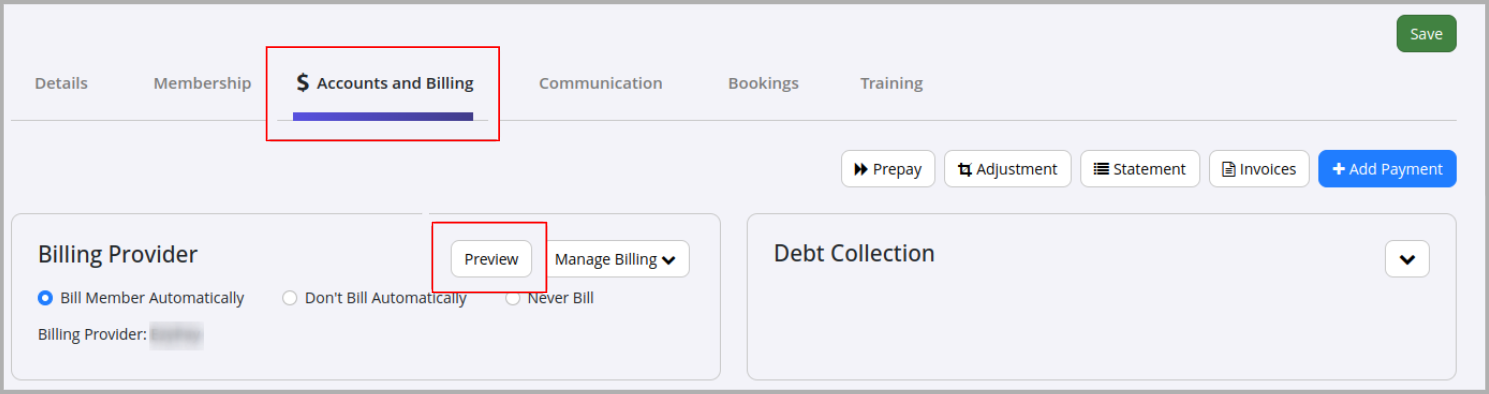
- Go to Member Profile > Accounts and Billing tab > Preview
This gives you a clear view of upcoming charges based on the member’s current setup.
A window will open showing all scheduled charges, including the dates the member is set to be billed over the next few billing cycles.
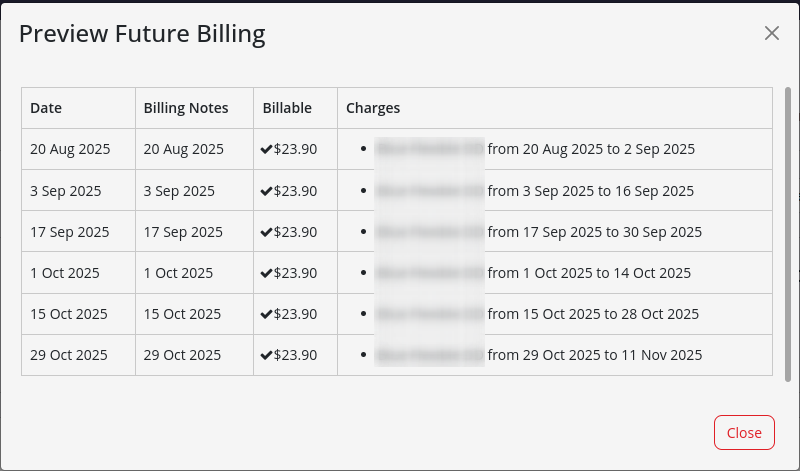
If nothing appears in this window, it means there are no upcoming integrated billing charges for the member.
This usually happens when:
- Billing details haven’t been set in the Accounts and Billing tab, or
- The member is not set to bill automatically in the same section
Further Questions? See our list of Frequently Asked Questions about Billing
Common Questions this Covers
- How to preview future charges
- How to view billing schedule for client
- How to see future costs in member account
Get started with a free, no-obligation chat, and see how we can help you grow

Awards and recognition
- Deloitte Master of Growth Index 2025
- Deloitte Master of Growth Index 2024
- Software Advice FrontRunners 2023
- GetApp Category Leaders 2023
- Capterra Best Value 2022
- GetApp Best Functionality & Features 2022
- Software Advice Most Recommended 2022
- SoftwareSuggest User Most Likely to Recommend Summer 2022
- Software Advice Best Customer Support 2021
- Deloitte Technology Fast 500 Asia Pacific 2018
 2026 © Treshna Enterprises Ltd.
