
Membership Contract Summary
1 min read
Updated
7 days ago
Your membership contract is the agreement between you and your member, outlining the key details of their membership.
This typically includes:
- Membership type
- Duration
- Fees
- Payment terms
GymMaster automatically creates a Membership Contract Summary for every membership, based on the settings in the membership type.
Members sign this during signup, and a copy is emailed to them straight after.
Customize Contracts
By default, default contracts are generated automatically from membership settings.
If you’d like more control, you can switch to custom contracts:
- Go to: Settings > Advanced Configuration > Membership
- Disable Use static membership contract
Once disabled, you can create your own templates:
- Go to: Settings > Forms and Waivers > + Contract Summary
This lets you tailor contracts for different membership types.
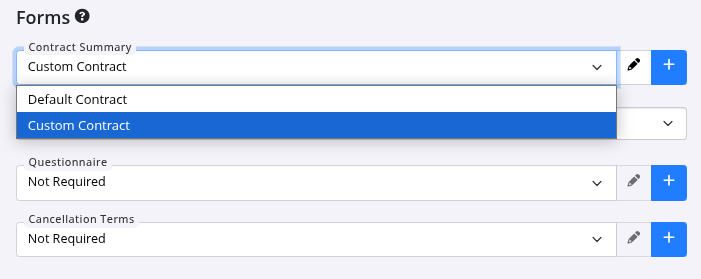
Attach custom contract to membership;
- Go to Settings > Membership Types > Membership
- Forms - Attach your custom contract here
View Member Contract
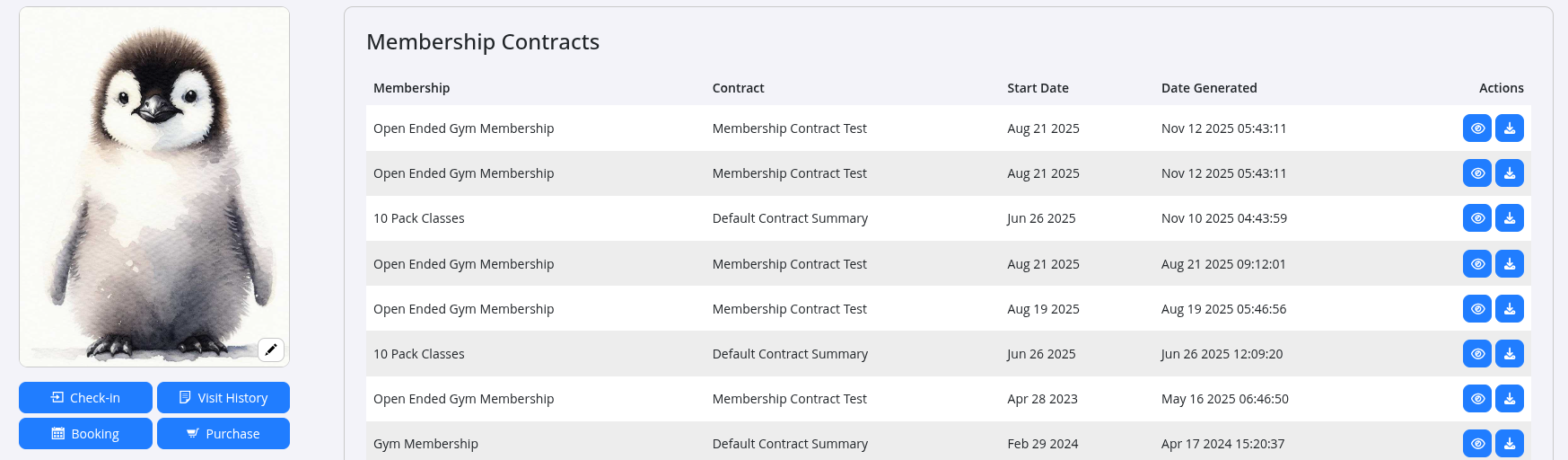
You can access a member’s contract anytime:
- Go to the Communication tab to view it in their history
- Select Contracts within the Communication tab
- Or head to Membership tab > Edit > Print New Contract
Common Questions this Covers
- How to create custom membership agreement or contract
- How to attach custom contract to membership
- How to view member contract or agreement
Get started with a free, no-obligation chat, and see how we can help you grow

Awards and recognition
- Deloitte Master of Growth Index 2025
- Deloitte Master of Growth Index 2024
- Software Advice FrontRunners 2023
- GetApp Category Leaders 2023
- Capterra Best Value 2022
- GetApp Best Functionality & Features 2022
- Software Advice Most Recommended 2022
- SoftwareSuggest User Most Likely to Recommend Summer 2022
- Software Advice Best Customer Support 2021
- Deloitte Technology Fast 500 Asia Pacific 2018
 2026 © Treshna Enterprises Ltd.