
Staff Access
1 min read
Updated
6 days ago
This guide assumes that hardware installation is complete and your chosen access method is already enabled.
You can now assign automated, individual access to staff members.
Allow Door Access
Begin by navigating to Settings > User Administration, selecting the staff account you want to allocate access to.
- Open to staff details tab, then select the Fob Number field to assign a key fob
- Swipe an unassigned key fob to link it to the staff member
- Next, assign an Access Roster
- The access roster controls the staff member’s door access hours. For example, you might grant access during general open hours only
- Create a new roster if required in Settings > Rosters and Open Hours
- Save
Note that Access rosters are separate from a staff members personal working roster
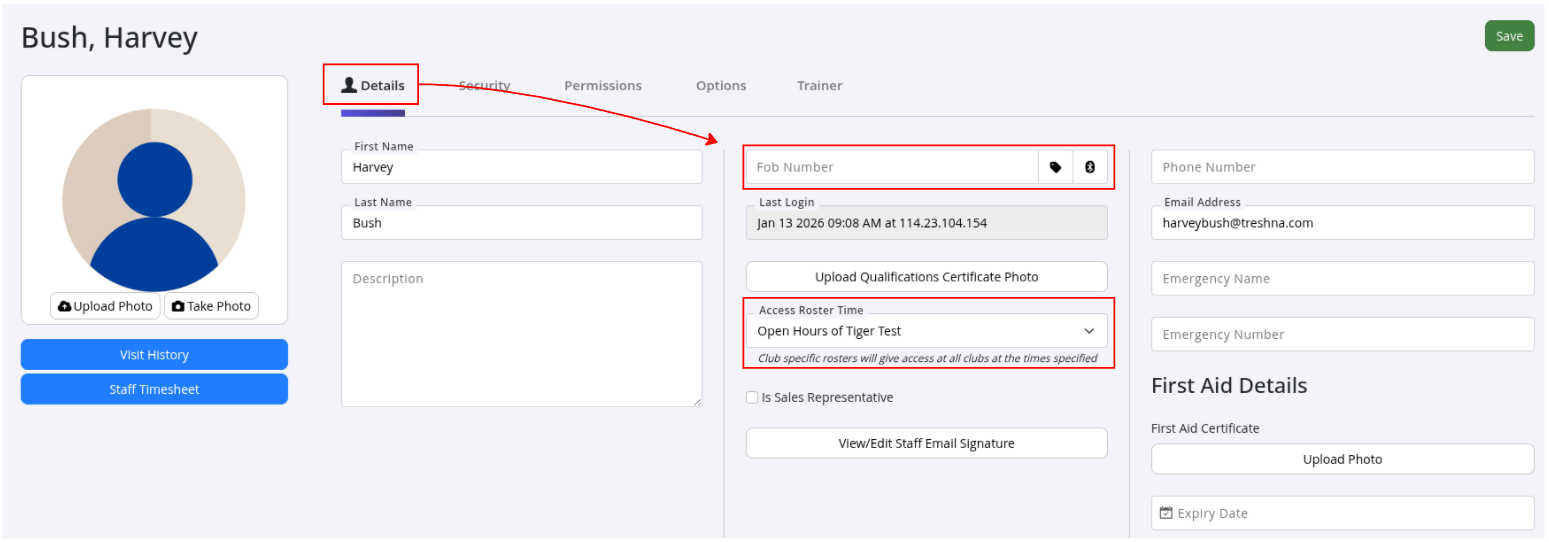
Once saved, the staff member will be able to access the club using their key fob during the hours defined by their assigned access roster.
Common Questions this Covers
- How do I give a staff member door access
- How do I assign a key fob to a staff member
- How do I set staff access hours
- What is an access roster and how does it work
- Why can’t my staff member access the gym with their fob
Get started with a free, no-obligation chat, and see how we can help you grow

Awards and recognition
- Deloitte Master of Growth Index 2025
- Deloitte Master of Growth Index 2024
- Software Advice FrontRunners 2023
- GetApp Category Leaders 2023
- Capterra Best Value 2022
- GetApp Best Functionality & Features 2022
- Software Advice Most Recommended 2022
- SoftwareSuggest User Most Likely to Recommend Summer 2022
- Software Advice Best Customer Support 2021
- Deloitte Technology Fast 500 Asia Pacific 2018
 2026 © Treshna Enterprises Ltd.
