
Open Hours and Door Access Rosters
1 min read
Updated
7 days ago
Rosters let you define what times of day certain features are active in your system.
They’re used in several areas, like controlling door access and restricting booking times for staff or facility resources.
Rosters are used for;
- Door Access Benefits: Limit access to specific times, like during staffed hours, or for off-peak memberships
- Booking Availability: Control when a resource (like a yoga room or trainer) has availability
How to Set Up a Roster
Begin at Settings > Roster & Open Hours
- Click the +Add Roster button
- Give your roster a clear name, Staffed Hours or Sauna Access
- Choose the type:
- Resource Roster - Used for controlling bookings
- Door Roster - Used for controlling access
- Set your Start and End times for each day
You can add split times if needed, for example, you can have access from 10am to 4pm, then again from 8:30pm to 10pm to allow for a break in the evening.
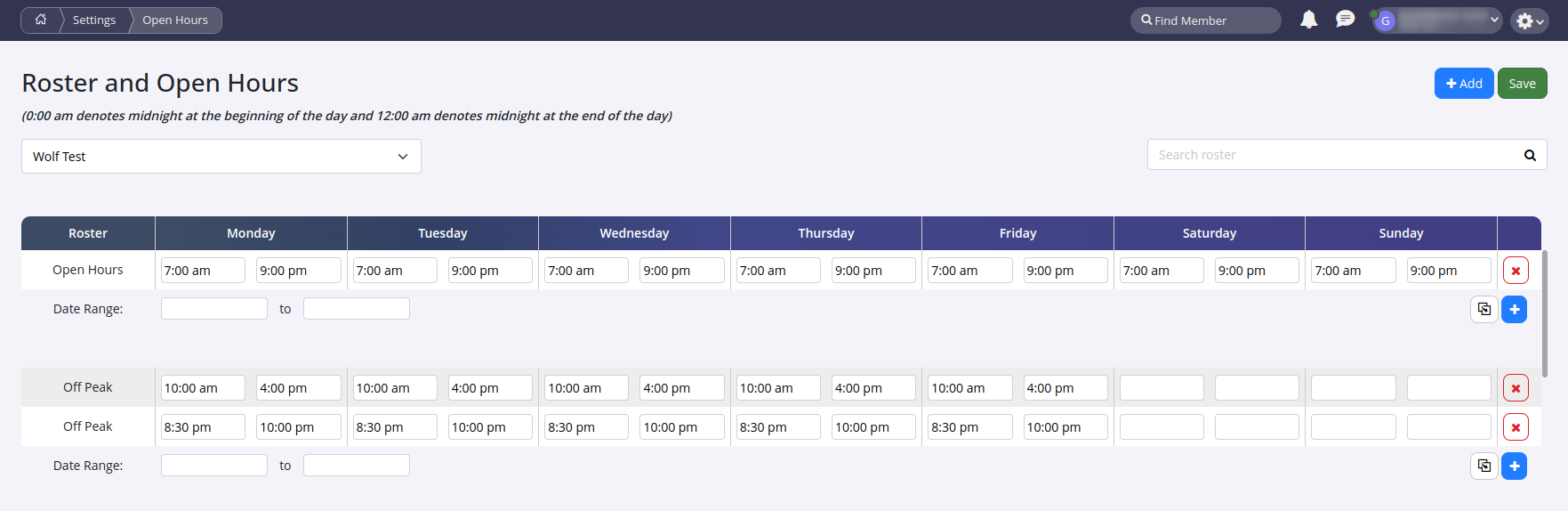
Once you’ve added your times for Monday, click the copy icon. This will copy Monday’s hours to the rest of the week; this is much way faster than manually setting each day.
Common Questions this Covers
- How to update open hours
- How to change open hours
- How to setup access hours
- How to setup different roster
Get started with a free, no-obligation chat, and see how we can help you grow

Awards and recognition
- Deloitte Master of Growth Index 2025
- Deloitte Master of Growth Index 2024
- Software Advice FrontRunners 2023
- GetApp Category Leaders 2023
- Capterra Best Value 2022
- GetApp Best Functionality & Features 2022
- Software Advice Most Recommended 2022
- SoftwareSuggest User Most Likely to Recommend Summer 2022
- Software Advice Best Customer Support 2021
- Deloitte Technology Fast 500 Asia Pacific 2018
 2026 © Treshna Enterprises Ltd.