
Manage Doors
1 min read
Updated
6 days ago
Note: Our staff will handle the back-end setup, connecting your hardware and doors with GymMaster.
Once GateKeeper and required hardware is setup and installed, you can manage access and door readers via Settings > Doors & Readers.
Here you can create specific access rules for your facility.
- Each reader is linked to a particular door and Gatekeeper
- Choose reader names that clearly identify which door a member has swiped
- Door status can be toggled between Open, Locked, or Active
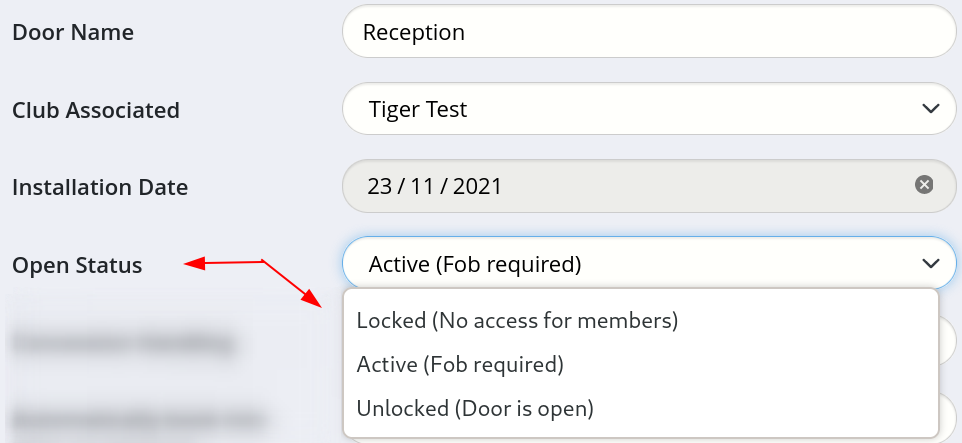
Controlled doors can be configured to automatically grant or deny access based on bookings.
You can assign doors as Female Access Only or Restricted, display door information in the Last Visits report, designate a door as an Exit, or enable Tailgating service.
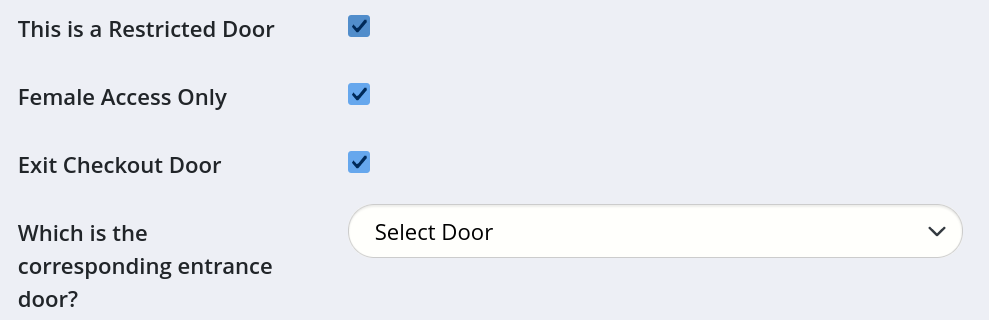
Common Questions this Covers
- How do I set up doors and door readers
- How do I change a door from locked to open
- How do I set up restricted or women-only door access
- Can I control door access based on bookings
- How do I adjust door reader settings and access rules
Get started with a free, no-obligation chat, and see how we can help you grow

Awards and recognition
- Deloitte Master of Growth Index 2025
- Deloitte Master of Growth Index 2024
- Software Advice FrontRunners 2023
- GetApp Category Leaders 2023
- Capterra Best Value 2022
- GetApp Best Functionality & Features 2022
- Software Advice Most Recommended 2022
- SoftwareSuggest User Most Likely to Recommend Summer 2022
- Software Advice Best Customer Support 2021
- Deloitte Technology Fast 500 Asia Pacific 2018
 2026 © Treshna Enterprises Ltd.
